Uni
1, command'based user interface
command'based user interfaces (using keyboard, voice, gesture) are faster, more convenient and more powerful,
than pointer'based user interfaces (using mouse, touch, pen)
pointer'based interface seems appealing at first sight, because of its discoverability
but with simple uniform GUI (ie the oposite of what we see in websites),
there is no need for a pointer based user interface
touch interface has an additional problem: interaction at a distance is not possible
note that, touch interface can be useful in special cases, but it's not good as a general purpose interface
detection of voice commands is a relatively simple process (compared to general speech recognition),
because we only need to match against a relatively small set of commands
for those who neither can use all their fingers, nor can talk, gesture based (2d) input can be implemented
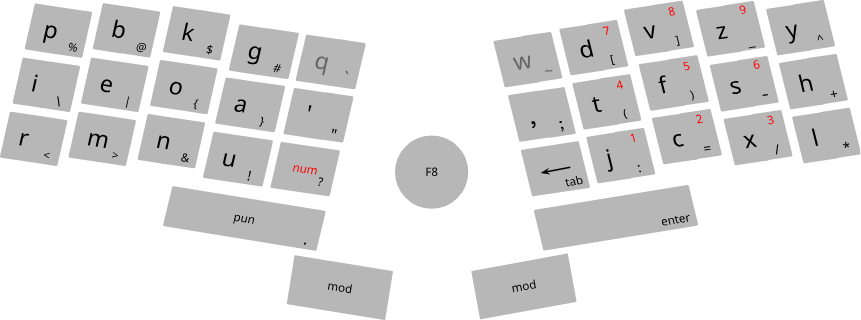
the ideal keyboard
navigation keys (arrows, page up, page down, home, end, tab, esc), and ctrl/shift/alt based keybindings,
are available by pressing and holding "mod" key
pressing one "mod" key while holding the other one, is equivalent to Super key
to insert punctuations, press "pun"
after entering a punctuation charactor, it automatically returns to normal mode
unless the "pun" key is still pressed, in which case, it will return to normal mode after releasing "pun"
to insert capital letters, press "cap"
after entering a charactor, it automatically returns to normal mode
unless the "cap" key is pressed twice, in which case, it will return to normal mode after pressing "cap", "space" or "enter"
to insert numbers, press and hold "num"
pressing and releasing "Fn", sends "Super+L" key press (usually bound to session locking)
holding "Fn" and pressing a number eg 1, sends "F1" key
Kinesis Advantage 2 keyboard
2, Uni
Uni is a unified collaborative development environment, and an ideal frontend for GNUnet,
with command'based user interface
it can be built and installed using UPM
list of all projects will appear in a floating layer, at the center of the screen, called overview layer
overview layer:
, left panel:
, roots: home directory, plus attached devices
, project groups: content of roots
, main view:
projects: content of project groups
in a project view, the list of files of a project will be displayed in the left side'bar
opened files will be slightly highlighted
files and directories with names starting with a dot, will be hidden
".cache" directory inside a project is for files we don't want to share or backup
each opened file will have a side'bar at right showing its sections
there we can create new view corresponding to a section
sections with views will be slightly highlighted
text files will be opened in a text editor
directories containing media files, will be opened in a gallery view
files and directories inside a gallery, will be opened in a floating layer
non'local projects, web pages, PDF documents, etc, accessed from links inside the main project,
will be opened in a floating layer
web pages: move caret between visual elements (ignoring structural elements)
actions:
, next/previous word, line, paragraph, section
ask before crossing files
, next/previous section view, opened file
, go to the list of files to open a file view
, go to the list of sections to open a section view
, start and end selection, then copy or cut
, paste
, undo
, navigation: move, search
, selection
, completion
right click or ctrl+enter: show a list of available commands and their key bindings
collaborative development
flaws of version control systems:
, they double the storage (working directory, local repository)
, their design makes it difficult to modify the history
so in practice, the whole history must be kept indefinitely, even if not needed
when we download a project, a pristine copy is kept untouched in ".cache/ude/pristine",
and ref links will be created in the working directory, and then we can work on our own branch
after a while when we want to pull and merge changes made in the main branch,
first a three'way diff will be shown, based on the main branch, pristine, and the working directory,
then the user will be asked to accept all or some parts of the diff
to send a pull request to the main branch, first publish the pristine and the working directory (except .cache),
then send the two addresses to the main developer
the main developer will make a diff based on these two, plus her own working directory
we can use GNUnet to share files in a P2P (a opposed to client'server) network